Records and Compliance Resources
Prepare For Your Project
There are three ways to conduct a Class I literature search at SHPO:
- Log into your paid Sego/UDAM account and follow the steps outlined in this document: How to do a Class 1 on Sego (PDF).
- Data Query ($15 total).
- Attach shapefile/gdb, KMZ/KML with project area, specify if a buffer on the area is needed.
- Results in an excel table with a list of existing sites, projects, IOs and sites assigned but not yet received by SHPO.
- No spatial is returned, so no need for a Sego User Agreement.
- GIS Data Cut ($15/section)
- Attach shapefile/gdb, KMZ/KML with project area, specify if a buffer on the area is needed.
- Returns GIS within sections intersecting project area or buffer.
- The User Agreement for Sego and UDAM (PDF) is required to receive spatial data.
Process, fees and forms for accessing Archaeological Records (Sego and UDAM) can be found on the Utah SHPO Records page.
All fees come from our legislative-approved fee schedule and are used for the maintenance of Sego and UDAM data.
Cultural Resource Compliance Guidance (PDF): a comprehensive guide for working in the state of Utah (2024 update).
Agency Archaeologist/Architecture Point of Contact List (Google Sheets): State and Federal agencies and contacts in Utah (updated as needed).
Utah Archaeological Permits: needed to conduct work in Utah, PI permit and Excavation Permit.
Projects are only assigned for Class III (“boots on the ground”), or monitoring with discoveries, NOT for Class I (desktop file searches), or monitoring without discoveries.
Email requests for Report Numbers to [email protected] with the following information:
- TitlePI
- County
- Land Owner (BLM, FS, Military, State, County, Private, or other).
Shapefile not required for Project Number Assignment
Is your organization new to SHPO? We will need to establish an organization code before assigning a project number. This may take up to a day longer.
record your findings - archaeology
Email [email protected] a project polygon shapefile or gdb. This is required. KML or maps are acceptable if shapefiles aren't available.
Each site requires (populate in shapefile or gdb if possible):
- Temp ID (agency ID in the template)
- Site name (if applicable)
- Date recorded
- Who recorded it
- Site class
- Site type
Templates are located here (Google Drive) if you choose to use one.
Why do we require a shapefile for site number assignment? SHPO Records checks new sites against existing sites to make sure that there aren't duplicate records.
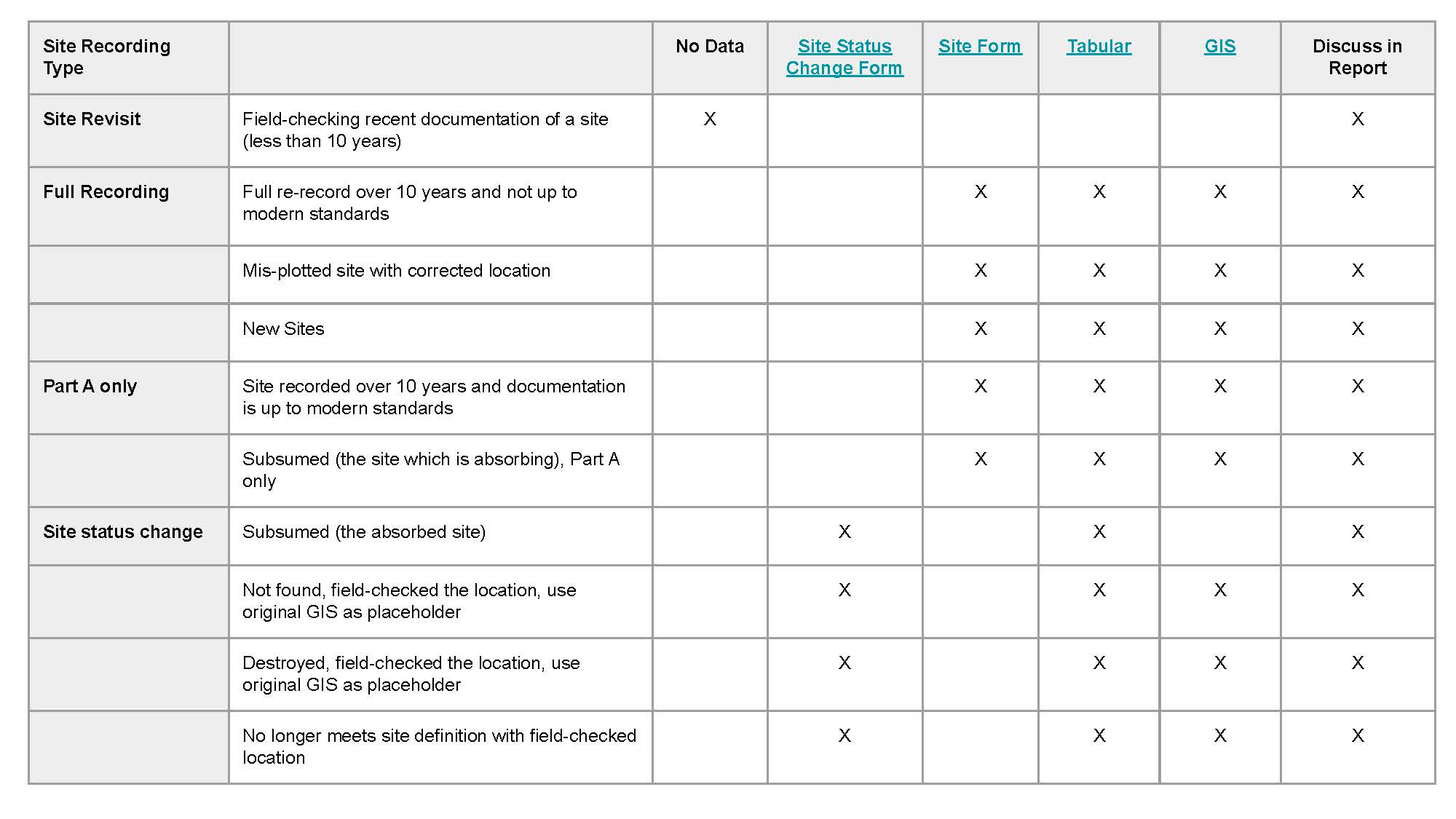
Utah Archaeological Site Form (UASF) (Google Drive): parts A through D
Site Status Change Form (Google Drive): for subsumed, not found, destroyed or downgraded sites
UASF Tabular Template (Google Sheets): provided with final 106 package, this site mirrors the UASF data. All information gets uploaded to our SQL database and connected with GIS.
Short Cultural Resources Inventory Report Form - Instruction Guide(.docx)
Short Cultural Resources Inventory Report Form (.docx): used for negative report findings
Isolated points and lines must be buffered by 5 meters or more, if appropriate.
Attribute data is described in the IO schema standards (linked below). It must be filled out with basic information:
- Date Recorded
- Temp Number (ie, the IO numbering sequence used in the report)
- Class
- Description
- Measurements
- Estimated Age
- SHPO Report Number
Isolate standards, schema and template for 106 submission (Google Drive): ask the managing agency if they have specific requirements regarding IOs.
Utah SHPO Historic Artifact Guide (PDF): a field and lab guide for identifying and dating historic artifacts
Historic Contexts (Google Drive): statewide collection of historic and archaeological contexts
Linear Site - Guidance for Identifying and Recording (2008) (PDF)
record your findings - historic architecture
Historic Site Form (Google Drive): full form, short form and continuation sheet
Cultural Resource Compliance Guidance (PDF): a comprehensive guide for working in the state of Utah (2024 update).
106 Guidance for Historic Building Submision and documentation (Google Drive)
Cultural Resource Compliance Guidance (PDF): a comprehensive guide for working in the state of Utah (2024 update).
The Secretary of the Interior's Standards for the Treatment of Historic Properties: Rehabilitation as a Treatment and Standards for Rehabilitation: National Park Service
General Architecture Guidance (Google Drive): SHPO
Protecting Historic Properties: Advisory Council on Historic Preservation (ACHP)
Submit Your Report for review
Steps for Creating New e106 Accounts in Salesforce Lightning
This section details how a user initiates the process and gains access to the e106 system.
- Initiate Account Request:
- Navigate to the e106 system (accessed via the SHPO website).
- Find the Account Request option.
- Complete and submit the required information in the form.
- Receive Confirmation:
- Wait for an email confirmation. This email will inform you that your account has been successfully created and is ready for use.
- Note: This verification process typically takes a few days.
Example Email
- Normal email: [email protected]
- Alias: [email protected]
e106 Questions
Direct any questions to [email protected]
